





ReactJs开发实战小游戏之井字棋游戏三
 xiupu.cc2023-08-25 08:29 阅读 297
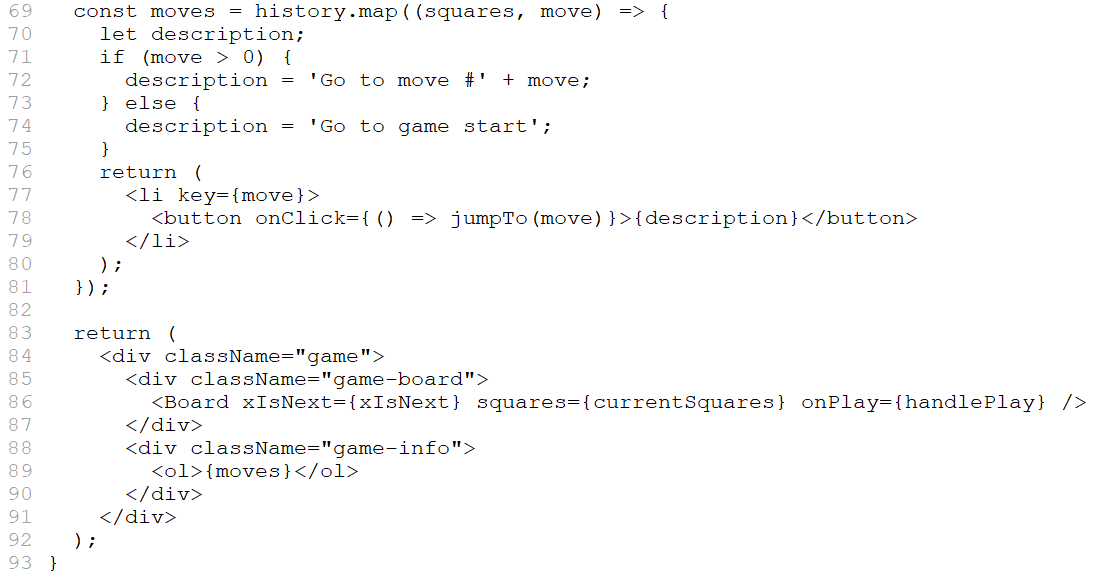
当你在传递给 map 的函数中遍历 history 数组时,squares 参数遍历 history 的每个元素,move 参数遍历每个数组索引:0 、1、2……(在大多数情况下,你需要数组元素,但要渲染落子列表,你只需要索引。)
对于井字棋游戏历史中的每一步,你创建一个列表项 <li>,其中包含一个按钮 <button>。该按钮有一个 onClick 处理程序,它调用一个名为 jumpTo 的函数(你尚未实现)。
现在,你应该会看到游戏中发生的动作列表和开发人员工具控制台中的错误。让我们讨论一下“关键”错误的含义。
选择 key
当你渲染一个列表时,React 会存储一些关于每个渲染列表项的信息。当你更新一个列表时,React 需要确定发生了什么变化。你可以添加、删除、重新排列或更新列表的项目。
想象一下从
<li>Alexa: 7 tasks left</li>
<li>Ben: 5 tasks left</li>
到
<li>Ben: 9 tasks left</li>
<li>Claudia: 8 tasks left</li>
<li>Alexa: 5 tasks left</li>
除了更新的计数之外,阅读本文的人可能会说你交换了 Alexa 和 Ben 的顺序,并在 Alexa 和 Ben 之间插入了 Claudia。然而,React 是一个计算机程序,无法知道你的意图,因此你需要为每个列表项指定一个 key 属性,以将每个列表项与其兄弟项区分开来。如果你的数据来自数据库,Alexa、Ben 和 Claudia 的数据库 ID 可以用作 key:
<li key={user.id}>
{user.name}: {user.taskCount} tasks left
</li>
重新渲染列表时,React 获取每个列表项的 key 并搜索前一个列表的项以查找匹配的 key。如果当前列表有一个之前不存在的 key,React 会创建一个组件。如果当前列表缺少前一个列表中存在的 key,React 会销毁前一个组件。如果两个 key 匹配,则落子相应的组件。
key 告诉 React 每个组件的身份,这使得 React 可以在重新渲染时保持 state。如果组件的 key 发生变化,组件将被销毁,新 state 将重新创建。
key 是 React 中一个特殊的保留属性。创建元素时,React 提取 key 属性并将 key 直接存储在返回的元素上。尽管 key 看起来像是作为 props 传递的,但 React 会自动使用 key 来决定要更新哪些组件。组件无法询问其父组件指定的 key。
强烈建议你在构建动态列表时分配适当的 key。如果你没有合适的 key,你可能需要考虑重组你的数据,以便你这样做。
如果没有指定 key,React 会报错,默认使用数组索引作为 key。在尝试重新排序列表项或插入/删除列表项时,使用数组索引作为 key 是有问题的。显式传递 key={i} 可以消除错误,但与数组索引有相同的问题,在大多数情况下不推荐使用。
key 不需要是全局唯一的;它们只需要在组件及其同级组件之间是唯一的。
实现时间旅行
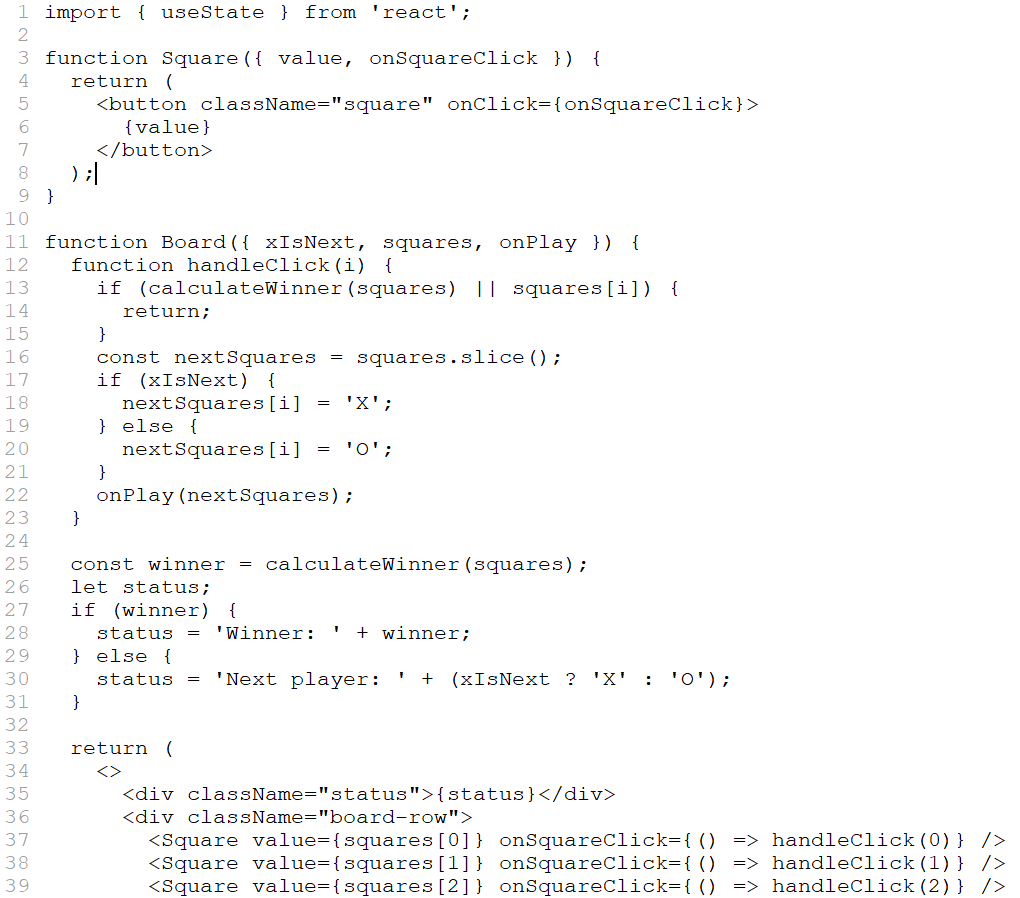
在井字棋游戏的历史中,过去的每一步都有一个唯一的 ID 与之相关联:它是动作的序号。落子永远不会被重新排序、删除或从中间插入,因此使用落子的索引作为 key 是安全的。
在 Game 函数中,你可以将 key 添加为 <li key={move}>,如果你重新加载渲染的游戏,React 的“key”错误应该会消失:
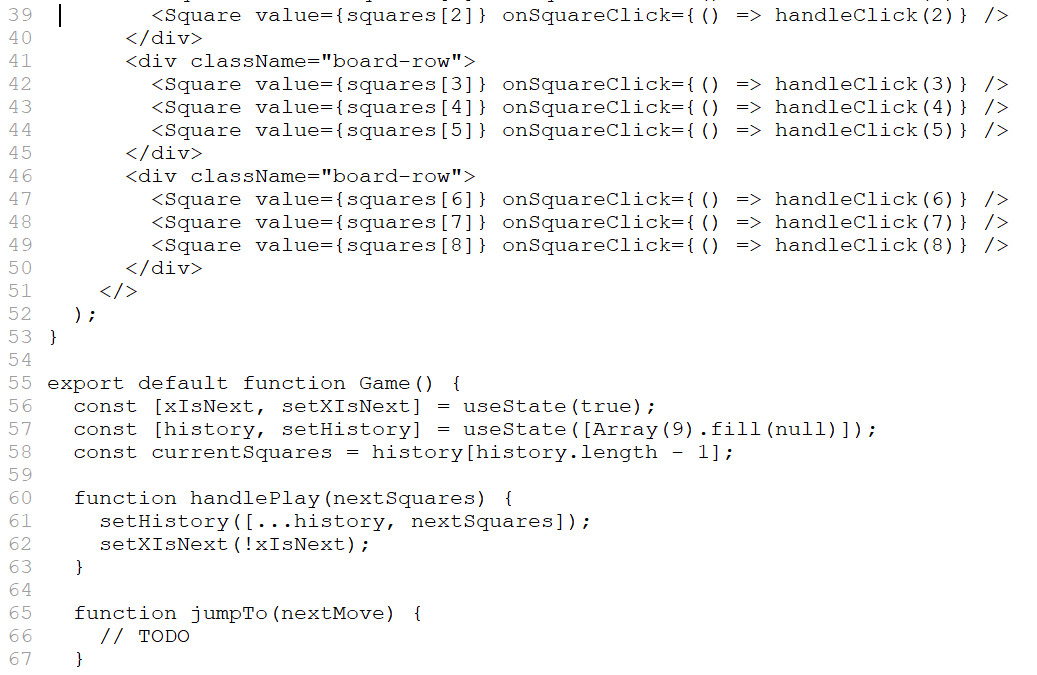
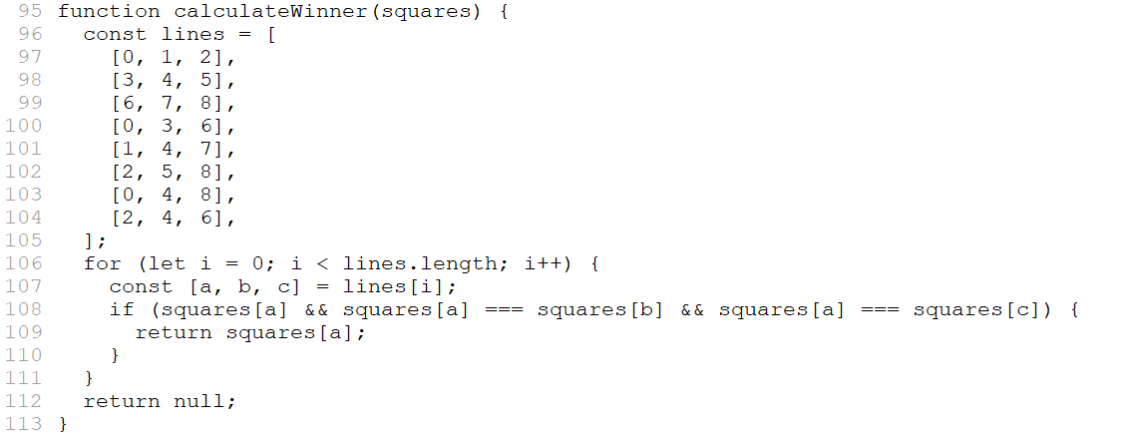
在你可以实现 jumpTo 之前,你需要 Game 组件来跟踪用户当前正在查看的步骤。为此,定义一个名为 currentMove 的新 state 变量,默认为 0:
export default function Game() {
const [xIsNext, setXIsNext] = useState(true);
const [history, setHistory] = useState([Array(9).fill(null)]);
const [currentMove, setCurrentMove] = useState(0);
const currentSquares = history[history.length - 1];
//...
}
接下来,更新 Game 中的 jumpTo 函数来更新 currentMove。如果你将 currentMove 更改为偶数,你还将设置 xIsNext 为 true。
export default function Game() {
// ...
function jumpTo(nextMove) {
setCurrentMove(nextMove);
setXIsNext(nextMove % 2 === 0);
}
//...
}
你现在将对 Game 的 handlePlay 函数进行两处更改,该函数在你单击方块时调用。
如果你“回到过去”然后从那一点开始采取新的行动,你只想保持那一点的历史。不是在 history 中的所有项目(... 扩展语法)之后添加 nextSquares,而是在 history.slice(0, currentMove + 1) 中的所有项目之后添加它,这样你就只保留旧历史的那部分。
每次落子时,你都需要更新 currentMove 以指向最新的历史条目。
function handlePlay(nextSquares) {
const nextHistory = [...history.slice(0, currentMove + 1), nextSquares];
setHistory(nextHistory);
setCurrentMove(nextHistory.length - 1);
setXIsNext(!xIsNext);
}
最后,你将修改 Game 组件以渲染当前选定的着法,而不是始终渲染最后的着法:
export default function Game() {
const [xIsNext, setXIsNext] = useState(true);
const [history, setHistory] = useState([Array(9).fill(null)]);
const [currentMove, setCurrentMove] = useState(0);
const currentSquares = history[currentMove];
// ...
}
如果你点击游戏历史中的任何一步,井字棋棋盘应立即更新以显示该步骤发生后棋盘的样子。
import { useState } from 'react';
function Square({value, onSquareClick}) {
return (
<button className="square" onClick={onSquareClick}>
{value}
</button>
);
}
function Board({ xIsNext, squares, onPlay }) {
function handleClick(i) {
if (calculateWinner(squares) || squares[i]) {
return;
}
const nextSquares = squares.slice();
if (xIsNext) {
nextSquares[i] = 'X';
} else {
nextSquares[i] = 'O';
}
onPlay(nextSquares);
}
const winner = calculateWinner(squares);
let status;
if (winner) {
status = 'Winner: ' + winner;
} else {
status = 'Next player: ' + (xIsNext ? 'X' : 'O');
}
return (
<>
<div className="status">{status}</div>
<div className="board-row">
<Square value={squares[0]} onSquareClick={() => handleClick(0)} />
<Square value={squares[1]} onSquareClick={() => handleClick(1)} />
<Square value={squares[2]} onSquareClick={() => handleClick(2)} />
</div>
<div className="board-row">
<Square value={squares[3]} onSquareClick={() => handleClick(3)} />
<Square value={squares[4]} onSquareClick={() => handleClick(4)} />
<Square value={squares[5]} onSquareClick={() => handleClick(5)} />
</div>
<div className="board-row">
<Square value={squares[6]} onSquareClick={() => handleClick(6)} />
<Square value={squares[7]} onSquareClick={() => handleClick(7)} />
<Square value={squares[8]} onSquareClick={() => handleClick(8)} />
</div>
</>
);
}
export default function Game() {
const [xIsNext, setXIsNext] = useState(true);
const [history, setHistory] = useState([Array(9).fill(null)]);
const [currentMove, setCurrentMove] = useState(0);
const currentSquares = history[currentMove];
function handlePlay(nextSquares) {
const nextHistory = [...history.slice(0, currentMove + 1), nextSquares];
setHistory(nextHistory);
setCurrentMove(nextHistory.length - 1);
setXIsNext(!xIsNext);
}
function jumpTo(nextMove) {
setCurrentMove(nextMove);
setXIsNext(nextMove % 2 === 0);
}
const moves = history.map((squares, move) => {
let description;
if (move > 0) {
description = 'Go to move #' + move;
} else {
description = 'Go to game start';
}
return (
<li key={move}>
<button onClick={() => jumpTo(move)}>{description}</button>
</li>
);
});
return (
<div className="game">
<div className="game-board">
<Board xIsNext={xIsNext} squares={currentSquares} onPlay={handlePlay} />
</div>
<div className="game-info">
<ol>{moves}</ol>
</div>
</div>
);
}
function calculateWinner(squares) {
const lines = [
[0, 1, 2],
[3, 4, 5],
[6, 7, 8],
[0, 3, 6],
[1, 4, 7],
[2, 5, 8],
[0, 4, 8],
[2, 4, 6],
];
for (let i = 0; i < lines.length; i++) {
const [a, b, c] = lines[i];
if (squares[a] && squares[a] === squares[b] && squares[a] === squares[c]) {
return squares[a];
}
}
return null;
}
最后清理
如果仔细查看代码,你可能会注意到当 currentMove 为偶数时为 xIsNext === true,而当 currentMove 为奇数时为 xIsNext === false。换句话说,如果你知道 currentMove 的值,那么你总能算出 xIsNext 应该是什么。
你没有理由将这两者都存储在 state 中。事实上,总是尽量避免冗余的 state。简化你在 state 中存储的内容可以减少错误并使你的代码更易于理解。更改 Game 使其不将 xIsNext 存储为单独的 state 变量,而是根据 currentMove 计算出来: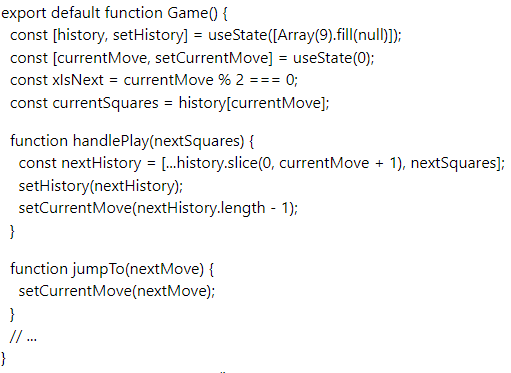
你不再需要 xIsNext state 声明或对 setXIsNext 的调用。现在,xIsNext 不可能与 currentMove 不同步,即使你的代码写错了。
收尾
祝贺!你已经创建了一个井字棋游戏,你实现了:
你现在可以玩的井字棋游戏
玩家在赢的时候有提示
随着游戏的进行存储游戏的历史
允许玩家回顾游戏的历史并查看棋盘的以前的版本
干得好!我们希望你现在觉得你对 React 的工作原理有了很好的了解。
在这里对照一下最终的结果吧:
import { useState } from 'react';
function Square({ value, onSquareClick }) {
return (
<button className="square" onClick={onSquareClick}>
{value}
</button>
);
}
function Board({ xIsNext, squares, onPlay }) {
function handleClick(i) {
if (calculateWinner(squares) || squares[i]) {
return;
}
const nextSquares = squares.slice();
if (xIsNext) {
nextSquares[i] = 'X';
} else {
nextSquares[i] = 'O';
}
onPlay(nextSquares);
}
const winner = calculateWinner(squares);
let status;
if (winner) {
status = 'Winner: ' + winner;
} else {
status = 'Next player: ' + (xIsNext ? 'X' : 'O');
}
return (
<>
<div className="status">{status}</div>
<div className="board-row">
<Square value={squares[0]} onSquareClick={() => handleClick(0)} />
<Square value={squares[1]} onSquareClick={() => handleClick(1)} />
<Square value={squares[2]} onSquareClick={() => handleClick(2)} />
</div>
<div className="board-row">
<Square value={squares[3]} onSquareClick={() => handleClick(3)} />
<Square value={squares[4]} onSquareClick={() => handleClick(4)} />
<Square value={squares[5]} onSquareClick={() => handleClick(5)} />
</div>
<div className="board-row">
<Square value={squares[6]} onSquareClick={() => handleClick(6)} />
<Square value={squares[7]} onSquareClick={() => handleClick(7)} />
<Square value={squares[8]} onSquareClick={() => handleClick(8)} />
</div>
</>
);
}
export default function Game() {
const [history, setHistory] = useState([Array(9).fill(null)]);
const [currentMove, setCurrentMove] = useState(0);
const xIsNext = currentMove % 2 === 0;
const currentSquares = history[currentMove];
function handlePlay(nextSquares) {
const nextHistory = [...history.slice(0, currentMove + 1), nextSquares];
setHistory(nextHistory);
setCurrentMove(nextHistory.length - 1);
}
function jumpTo(nextMove) {
setCurrentMove(nextMove);
}
const moves = history.map((squares, move) => {
let description;
if (move > 0) {
description = 'Go to move #' + move;
} else {
description = 'Go to game start';
}
return (
<li key={move}>
<button onClick={() => jumpTo(move)}>{description}</button>
</li>
);
});
return (
<div className="game">
<div className="game-board">
<Board xIsNext={xIsNext} squares={currentSquares} onPlay={handlePlay} />
</div>
<div className="game-info">
<ol>{moves}</ol>
</div>
</div>
);
}
function calculateWinner(squares) {
const lines = [
[0, 1, 2],
[3, 4, 5],
[6, 7, 8],
[0, 3, 6],
[1, 4, 7],
[2, 5, 8],
[0, 4, 8],
[2, 4, 6],
];
for (let i = 0; i < lines.length; i++) {
const [a, b, c] = lines[i];
if (squares[a] && squares[a] === squares[b] && squares[a] === squares[c]) {
return squares[a];
}
}
return null;
}
如果你有额外的时间或想练习新的 React 技能,这里有一些你可以改进井字棋游戏的想法,按难度递增的顺序列出:
仅针对当前着手,显示“You are at move #…”而不是按钮。
重写 Board 以使用两个循环来制作方块而不是对它们进行硬编码。
添加一个切换按钮,使可以按升序或降序对落子的步数进行排序。
当有人获胜时,突出显示致使获胜的三个方块(当没有人获胜时,显示一条关于结果为平局的消息)。
在“落子”的历史列表中以 (row, col) 格式显示每步的位置。
在本教程中,你已经接触到了 React 概念,包括元素、组件、props 和 state。现在你已经了解了这些概念在构建游戏时是如何工作的,请查看 React 哲学 以了解这些 React 概念在构建应用的 UI 时是如何工作的。


在线评论